 Vamimi
The automation handover document, made for you
When an automation goes live, the client needs to know what it does and what to do when it stops. VamimiAI puts the diagram, a step table, the accounts it needs and plain care notes on one page you can print or save as PDF.
The prompt: Write handover notes for my client for this workflow
. It goes into the message box for you to edit; nothing is sent until you press Send.
How it works
Import or describe it
Attach an n8n, Make or Zapier export, or describe the automation in the chat.
Fix what is flagged
The checks list what will hurt after handover, from silent failures to keys typed into a step.
Create the handover
Add the client's name and your contact details, then print it or save it as PDF, or download it as a web page.
What you get
The diagram first
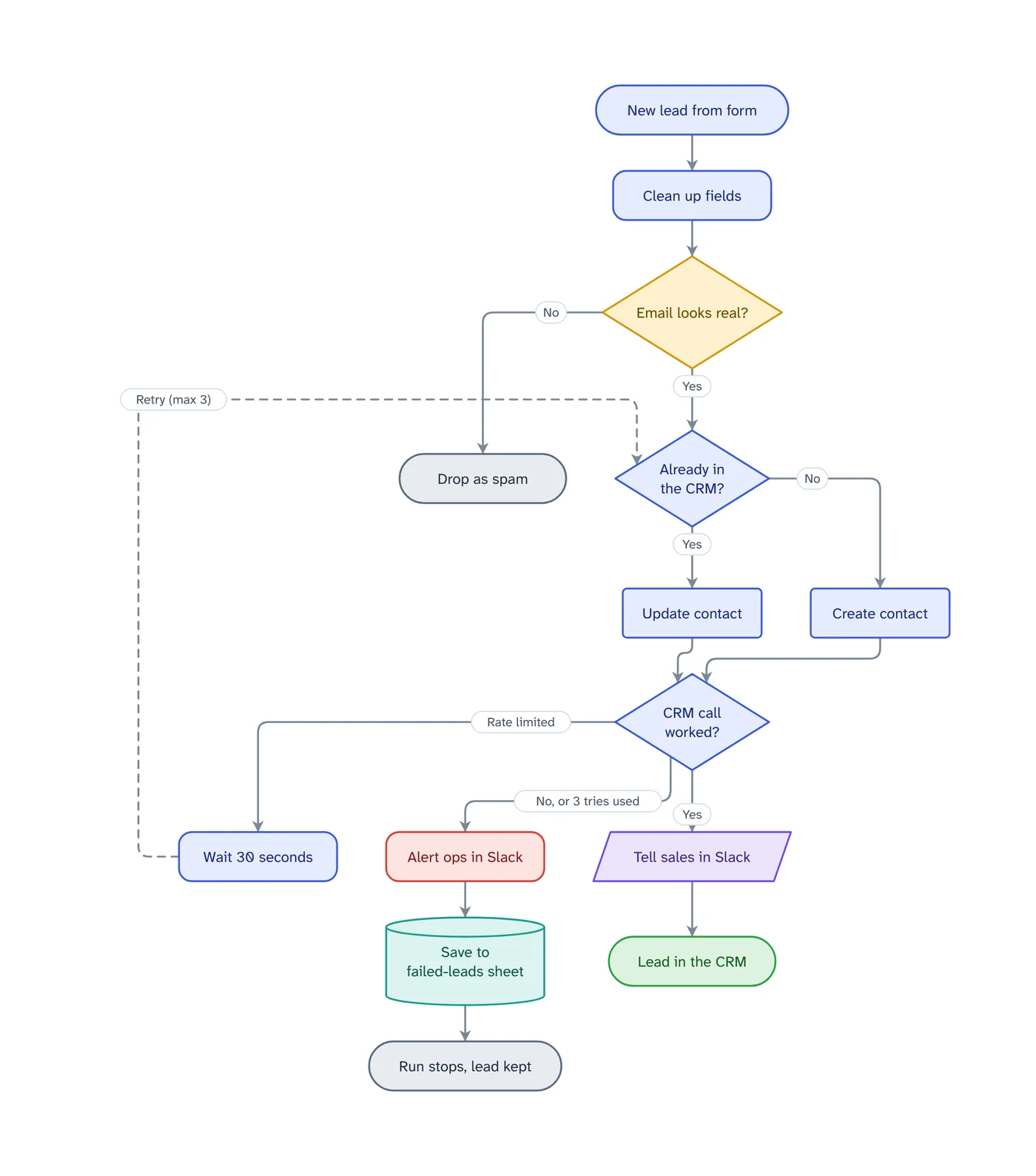
Every step and every failure path, with a short key to the colours and dashed lines.
What each step does
A table in plain words, with what happens if each step fails.
Accounts it needs
The logins the automation depends on, by name only, and where to reconnect them.
Looking after it
Where failed runs are listed on that platform and what to do before changing anything.
Your name on it
Your name or studio and your contact details on the cover, saved for every handover.
Made in your browser
The document is put together on your device. Nothing is uploaded to make it.
What a good automation handover covers
A handover is what stops the call three months later saying it stopped working. It should answer four questions in plain words: what starts the automation, what it does step by step, what happens when something fails, and what the client must keep working, such as logins and the column names of a sheet.
Write it for the person who will notice a problem, not for the person who built the workflow. Name the apps the way the client knows them, and say who to contact.
Ask VamimiAI to explain the workflow for a non-technical client and that explanation can go into the document too.
Automation handoff checklist
Before the handoff: every step that calls an outside service retries or has a failure path, failures alert someone, no key is typed into a step, webhooks are protected, and every decision exit leads somewhere. The checks on import list what is still open, most serious first.
At the handoff: the diagram, what each step does and what happens if it fails, the accounts and logins the client must keep working, where failed runs show up on the platform, and who to call. That is exactly what the document holds.
A client handover template that fills itself in
Instead of copying a blank template for every client, import the workflow or describe it, and the step table, the accounts list and the care notes come from the automation itself. Your name and contact details are remembered for the next one.
Prompts to start from
Questions
Which platforms does it work with?
n8n workflows and Make blueprints are read exactly. Zapier exports are read on a best-effort basis. Any automation you describe in the chat can be drawn and handed over too.
Can I put my own name on it?
Yes. Your name or studio and your contact details go on the cover and in the contact line, and are remembered for the next handover.
Can I leave out the problems VamimiAI found?
Yes. The list of things to check is left out unless you choose to include it.
What format is it?
One web page you can print or save as PDF from the print dialog, or download as an .html file.
Is a handover the same as a handoff?
Yes. Builders use both words for the same job: giving the client what they need to understand the automation and keep it running. The document covers both the explanation and the care notes.
Guides on this
- n8n vs Make vs Zapier for Client Work: Failures and Handovern8n vs Make vs Zapier compared on what matters after you hand an automation to a client - what happens when a step fails, who is told, and how you document it.1 November 2026 · 4 min read
- n8n Error Workflow Not Triggering? 6 Causes and FixesWhy an n8n error workflow does not run when a workflow fails, how to check each cause in a few minutes, and how to test it safely before a client relies on it.1 November 2026 · 3 min read
- n8n Error Handling: Catch Every Failure Before a Client DoesRetry On Fail, error outputs, Continue, error workflows and the Error Trigger in n8n, what each one does and which to use for steps that call outside services.1 November 2026 · 5 min read
- Make Scenario Deactivated? Errors and Incomplete ExecutionsWhy Make switches a scenario off, what "not enough space to add a new incomplete execution" means, and the settings that keep a scenario running.1 November 2026 · 3 min read
- Make Error Handlers: Break, Rollback, Commit, Ignore, ResumeWhat each Make error handler directive does to the run, the bundle and your data, when to use it, and the scenario settings that decide if a failure is lost.1 November 2026 · 4 min read
- How to Document an n8n Workflow for a ClientA handover (or handoff) checklist for n8n freelancers and agencies: what to write down, what to draw, and how to show a client what a failure does.1 November 2026 · 5 min read
Make something else
- n8n workflow diagram from your export, with every error pathDownload the workflow from n8n and drop the file into VamimiAI.
- Turn a Make blueprint into a flowchart your client can readExport the blueprint from Make and drop it into VamimiAI.
- Turn a document into a flowchartPolicies, procedures and specs describe processes in long paragraphs.
- AI flowchart generatorWrite how a process works, the way you would explain it to a colleague.
Part of Automation documentation: Diagrams, failure checks and handover documents for the automations you build for clients: n8n workflows, Make scenarios and Zaps.
Describe it. Get the diagram.
No account needed. Write what you want, or attach a document, and refine the result by asking.
Open VamimiAI