 Vamimi
Decision tree maker
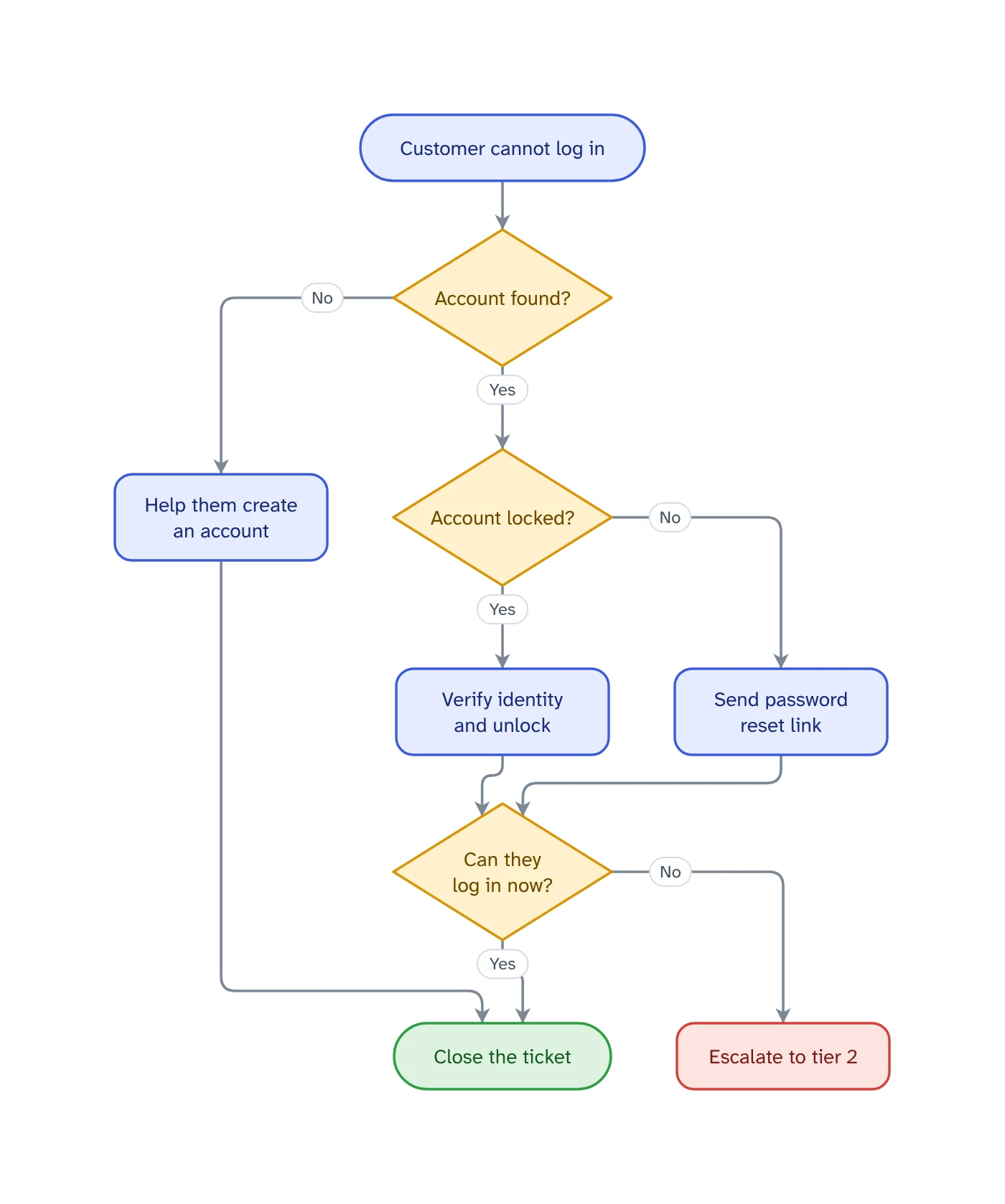
Write the questions in the order someone asks them and what each answer leads to. VamimiAI draws the decision tree: every question, a labelled branch for each answer, and an end for every path.
The prompt: Decision tree for a customer who cannot log in: check the account exists, check if it is locked, reset the password, escalate if it still fails
. It goes into the message box for you to edit; nothing is sent until you press Send.
How it works
Write the questions
Start from the problem as the customer states it, then each question in the order you would ask it and what each answer leads to.
Get the tree
Every question is a decision with a labelled branch for each answer, and every path ends in a fix or an escalation.
Refine by asking
Say “add a retry”, “split the payment step” or “make it left to right”. Only what you ask for changes.
What you get
Every branch labelled
Each answer has its own line with its own label, so the reader never has to guess which way “No” goes.
Dead ends are caught
Logic checks catch a question with only one answer drawn, a step that leads nowhere and a step nothing reaches.
Escalations stand out
An end that means failure or escalation is drawn in red and one that means solved in green, so the outcome of every path is clear.
Start from a document
Attach a policy, spec or spreadsheet and ask for the diagram. Most files are read right in your browser.
Edit by hand too
Drag, resize, connect, add shapes, type labels, undo and redo. Your next message continues from your version.
Download anywhere
SVG, PNG, JPEG or PDF for every visual. Flow diagrams also export to draw.io and Mermaid.
What makes a decision tree usable on a live call
A decision tree for support or troubleshooting is a set of questions with a known next step for every answer. Its job is to let someone who has never seen the problem reach the same fix as your most experienced person.
Ask one thing per question, and make it something the agent can find out in seconds: “Account found?” rather than “Is there an account problem?”. Put the most common cause first, so most calls leave the tree early.
Every path must end: in a fix, or in an escalation that says who takes over. A branch that stops in the middle is the moment an agent starts improvising, and the tree was written to prevent exactly that.
Troubleshooting flowchart for technical problems
For a fault, order the checks by how likely the cause is and how cheap the check is: is it plugged in comes before replacing a part. Each check is a question, each result a branch, and the last branch of every path is the hand-over to the next tier.
Describe it that way to VamimiAI, one check after another, and the troubleshooting flowchart is drawn in that order. Ask for left to right if it will be read on a wide screen during a call.
Customer service and escalation flows
Triage is a decision tree too: is the service down, is it a billing question, is the answer already in the help centre. Draw it once and new agents route tickets the way your experienced ones do.
For escalation, write the condition on the branch (“not solved after two attempts”, “customer asks for a manager”) and who receives it. An escalation path that names a person or a team gets used; one that says “escalate” does not.
Not the machine-learning kind
A decision tree is also the name of a model in data science, trained from data. This page is about the other meaning: a diagram of questions and answers that a person follows. VamimiAI draws those; it does not train models.
Prompts to start from
- Decision tree for a customer who cannot log in: check the account exists, check if it is locked, reset the password, escalate if it still failsTry it →
- Troubleshooting flowchart for a printer that will not print, from the simplest check to calling a technicianTry it →
- Support ticket triage decision tree: outage, billing, how-to question, bug reportTry it →
- Decision tree for whether a refund request is approved, with the conditions on each branchTry it →
Questions
What is a decision tree?
A diagram that starts from one question and branches on each answer until every path reaches an outcome. Teams use it so that a decision or a diagnosis is made the same way every time.
How is a decision tree different from a flowchart?
A decision tree is a flowchart made mostly of questions: it branches at nearly every step and rarely loops back. VamimiAI draws both from a description.
How many answers can a question have?
As many as you describe. Yes and No are the most common, but a question such as “What kind of request?” can branch three or four ways, each with its own label.
Can I make one from our troubleshooting guide?
Yes. Attach the guide as a PDF, Word or text file and ask for the decision tree of the steps it describes.
Can agents click through it step by step?
No. VamimiAI makes the diagram, which you can download as PNG, JPEG, SVG or PDF and put in your help centre or knowledge base. It is not an interactive script.
Guides on this
Make something else
- Process flowchart makerWrite how the work gets done, in the order it happens, or attach the procedure you already have.
- AI flowchart generatorWrite how a process works, the way you would explain it to a colleague.
- Turn a document into a flowchartPolicies, procedures and specs describe processes in long paragraphs.
- Swimlane diagram makerWhen a process passes between people or teams, a swimlane diagram shows who does each step.
Part of Process mapping: Process maps for operations, HR, support and product teams: process flowcharts, onboarding flows, decision trees and user flows, drawn from a description.
Describe it. Get the diagram.
No account needed. Write what you want, or attach a document, and refine the result by asking.
Open VamimiAI