 Vamimi
n8n workflow diagram from your export, with every error path
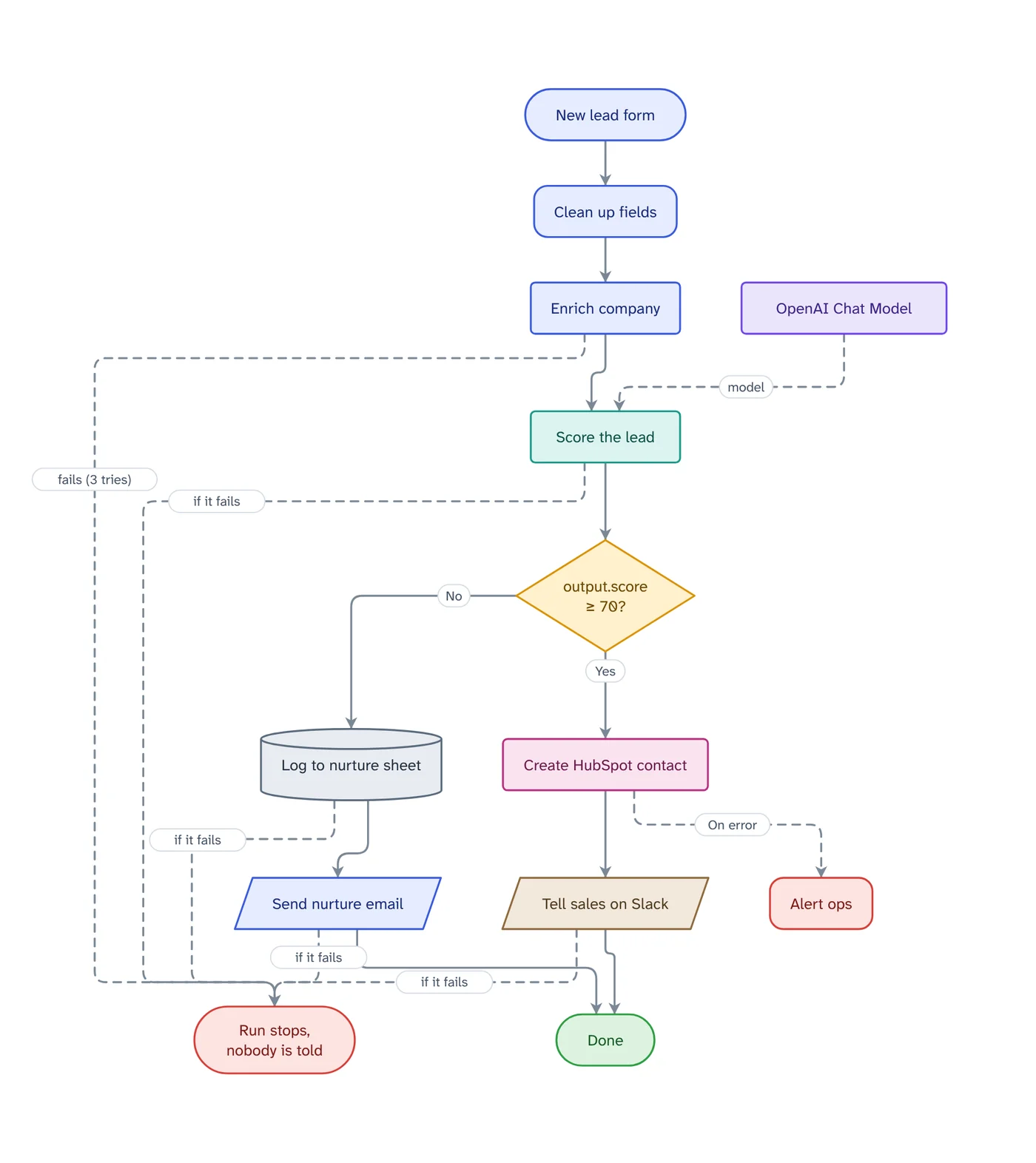
Download the workflow from n8n and drop the file into VamimiAI. You get every node as a plain step, the If and Switch branches labelled, the error outputs drawn, and a red end for every failure nothing catches.
The prompt: Design an n8n workflow that sends new form leads to HubSpot and Slack, with every failure path
. It goes into the message box for you to edit; nothing is sent until you press Send.
How it works
Export from n8n
In the workflow menu choose Download, or select the nodes and copy them. Both give the workflow as JSON.
Paste or attach it
Drop the .json file into the chat or paste the JSON. It is read straight from the file, with no AI guesswork, and secrets are never shown.
Hand it over
Check what is flagged, ask for a plain-words explanation, and create the client handover document.
What you get
Every path, labelled
If exits read Yes and No, Switch exits keep their names, loops say Done and Next batch, and error outputs are drawn dashed.
Failures you would miss
Each node that calls an outside service and has no retry or error path leads to a red end that says what really happens: the run stops, and whether anyone is told.
Checks before handover
Webhooks without authentication, keys typed into a node, If exits that lead nowhere, nodes nothing reaches, default names and missing error workflows.
Tables for the client
What each step does, what happens if it fails, and the accounts it needs, by name only.
AI agents included
Models, memory and tools plugged into an AI Agent are drawn feeding it, and listed under the accounts.
Download anywhere
SVG, PNG, JPEG or PDF for every visual. Flow diagrams also export to draw.io and Mermaid.
Why a diagram beats the workflow JSON at handover
A client who opens the workflow file sees a wall of JSON, and a screenshot of the canvas shows node types rather than what the business gets. A diagram in plain steps answers what they actually ask: what starts it, what it does, and what happens when something breaks.
The failure paths matter most. Most n8n nodes stop the whole run when the service behind them is down, rate-limits you or loses its login, and unless an error workflow is set, nobody is told. Seeing those paths in red before the handover is the cheapest time to fix them.
Once it is imported, the diagram is an ordinary VamimiAI diagram: edit it by hand, ask for changes, or download it as PNG, PDF, draw.io or Mermaid.
Visualize an n8n workflow without screenshots
A screenshot of the n8n canvas shows node types and only the lines you connected. Importing the workflow file draws every node as a plain step, labels each If and Switch exit, draws error outputs dashed, and ends every unprotected call to an outside service in a red end that says what really happens.
The result is an ordinary VamimiAI diagram: rearrange it by hand, ask for changes in the chat, or play it as a step-by-step walkthrough.
Export an n8n workflow as JSON
In n8n, open the workflow and choose Download from its menu, or select the nodes and copy them; both give the workflow as JSON. An export carries the names and IDs of the credentials the workflow uses, so check it before you share it anywhere.
VamimiAI uses credential names only to list the accounts the workflow needs. A key typed straight into a node is reported by where it is, and its value is never shown.
Download the diagram as PNG, PDF, Mermaid or draw.io
Every diagram downloads as SVG, PNG, JPEG or PDF, as an editable draw.io file, as Mermaid text for a README or wiki, or as an MP4 walkthrough video to send with the handover.
Prompts to start from
- Design an n8n workflow that sends new form leads to HubSpot and Slack, with every failure pathTry it →
- Draw an n8n error workflow that alerts ops in Slack when any workflow failsTry it →
- Show how a Stripe webhook reaches n8n and Airtable as a sequence diagramTry it →
- Turn these discovery call notes into a proposed n8n workflow with open questions:Try it →
Questions
How do I export a workflow from n8n?
Open the workflow, choose Download from its menu, and attach the .json file. Copying selected nodes and pasting them into the chat works too.
Are my credentials or API keys read?
Only the names of the credentials are used, to list the accounts the workflow needs. A key typed into a node is flagged by where it is, and its value is never shown.
Does importing use AI?
No. The workflow file is read as it is, so the steps, branches and error paths are exactly what the workflow contains. Asking questions about it afterwards uses the chat.
What does the red Run stops box mean?
It collects every outside call that has no retry and no error path in the workflow. Its label says what happens then: the run stops, and whether an error workflow is told.
Can I change the diagram after importing?
Yes. Drag, rename and connect by hand, or ask in the chat, for example to add error handling to every red path.
Guides on this
- n8n vs Make vs Zapier for Client Work: Failures and Handovern8n vs Make vs Zapier compared on what matters after you hand an automation to a client - what happens when a step fails, who is told, and how you document it.1 November 2026 · 4 min read
- n8n Error Workflow Not Triggering? 6 Causes and FixesWhy an n8n error workflow does not run when a workflow fails, how to check each cause in a few minutes, and how to test it safely before a client relies on it.1 November 2026 · 3 min read
- n8n Error Handling: Catch Every Failure Before a Client DoesRetry On Fail, error outputs, Continue, error workflows and the Error Trigger in n8n, what each one does and which to use for steps that call outside services.1 November 2026 · 5 min read
- How to Document an n8n Workflow for a ClientA handover (or handoff) checklist for n8n freelancers and agencies: what to write down, what to draw, and how to show a client what a failure does.1 November 2026 · 5 min read
Make something else
- n8n to Mermaid and draw.io, from the workflow fileDrop an n8n workflow export into VamimiAI and download it as Mermaid text or an editable draw.io file.
- The automation handover document, made for youWhen an automation goes live, the client needs to know what it does and what to do when it stops.
- Turn a Make blueprint into a flowchart your client can readExport the blueprint from Make and drop it into VamimiAI.
- AI diagrams you can open in draw.ioLet VamimiAI do the layout from a description, then download an editable draw.io file and keep working in the tool your team already uses.
Part of Automation documentation: Diagrams, failure checks and handover documents for the automations you build for clients: n8n workflows, Make scenarios and Zaps.
Describe it. Get the diagram.
No account needed. Write what you want, or attach a document, and refine the result by asking.
Open VamimiAI