 Vamimi
User flow diagram maker
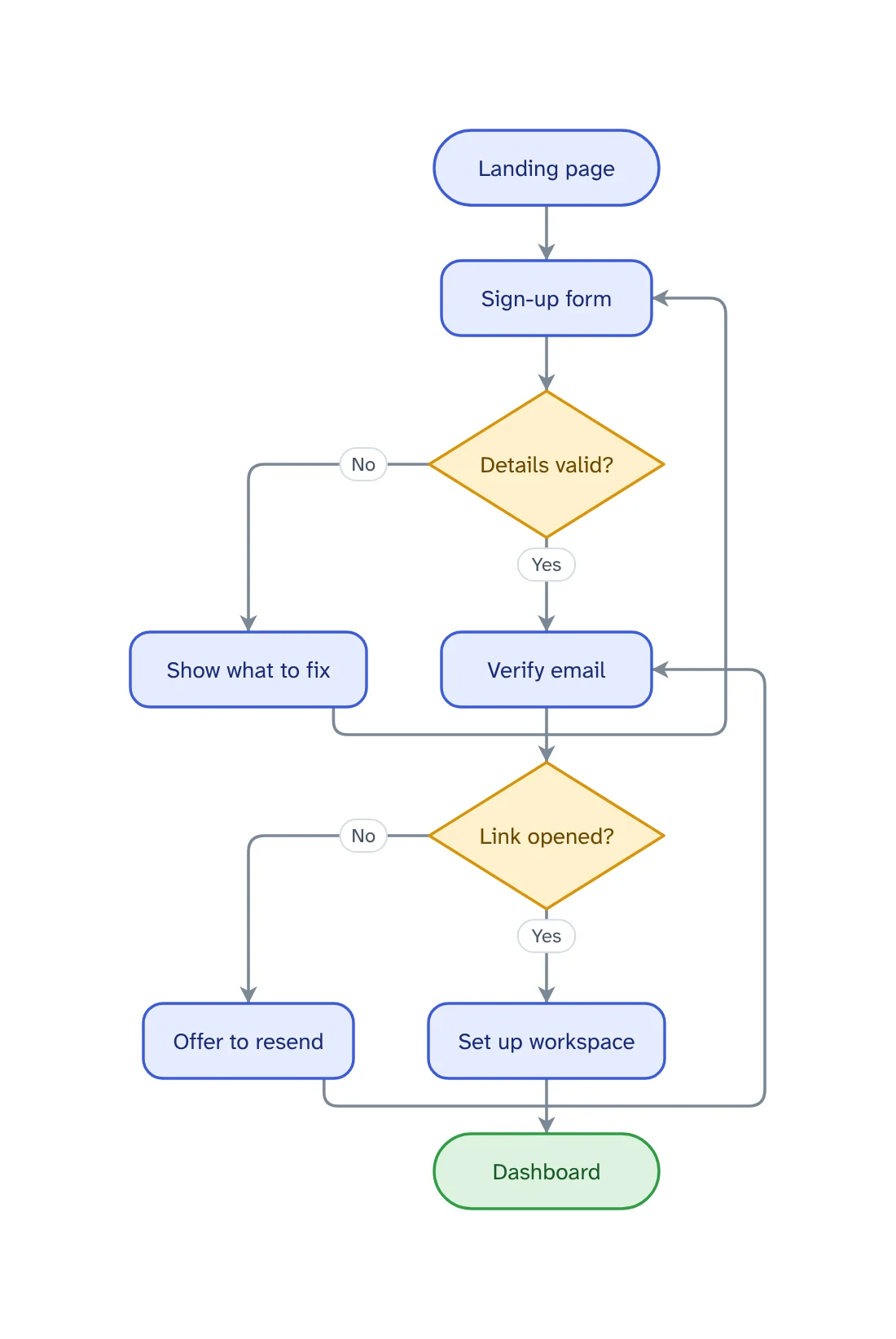
Write the path a person takes through your product: where they arrive, what they do, where it can go wrong. VamimiAI draws the user flow diagram, including the paths a happy-path sketch leaves out.
The prompt: User flow diagram of signing up for a web app: landing page, sign-up form, email verification, workspace setup, dashboard, with the error paths
. It goes into the message box for you to edit; nothing is sent until you press Send.
How it works
Describe the path
Name the entry point, the screens or steps in order, and the goal the person is trying to reach.
Get the user flow
Screens and actions as steps, choices and checks as decisions, and a line for every way a step can turn out.
Refine by asking
Say “add a retry”, “split the payment step” or “make it left to right”. Only what you ask for changes.
What you get
Error paths included
Ask for the error paths and each check gets both of its exits: what the person sees when it passes and when it does not.
Reads left to right
Ask for left to right and the flow reads the way a journey through screens is usually drawn.
Checked for gaps
Logic checks catch a decision with only one exit, a step that leads nowhere and a step nothing reaches.
Start from the spec
Attach the requirements document or user stories as a PDF, Word or text file and ask for the user flow it describes.
Edit by hand too
Drag, resize, connect, add shapes, type labels, undo and redo. Your next message continues from your version.
Download anywhere
SVG, PNG, JPEG or PDF for every visual. Flow diagrams also export to draw.io and Mermaid.
What a user flow diagram is for
A user flow diagram shows the steps one person takes to reach one goal in a product: the entry point, each screen or action, each choice, and the end. Product managers and designers draw it before the screens exist, because it is far cheaper to find a missing step in a diagram than in a design.
The value is in the branches. The path where everything goes right is the one everybody already imagines; the flow earns its keep on what happens when a password is wrong, an email is never opened or a payment is declined.
Draw one goal per flow. “Sign up”, “Invite a teammate” and “Upgrade the plan” are three diagrams. A single diagram of the whole product is a site map, which answers a different question.
User flow, task flow and user journey
A task flow is a single path with no branches: the steps of one task for one kind of user. A user flow adds the decisions and the different ways in. A user journey map is wider and softer: it follows a person across channels and time and records what they think and feel at each stage.
VamimiAI draws the first two, as flowcharts. It does not make journey maps with emotion curves; for the stages of a journey in order, a timeline or a table is the closer fit.
From user stories or a requirements document
A user flow is often hiding in a requirements document as a list of “the user can” sentences. Attach the document and ask for the flow of one goal at a time. Then read the decisions: a requirement that names only the successful result leaves the other exit undrawn, and that gap is worth raising before design starts.
Sharing the flow with design and engineering
Download the flow as PNG, JPEG, SVG or PDF for a document or a ticket. Flow diagrams also export to draw.io, where they stay editable, and to Mermaid text, which lives well in a repository or a wiki that renders it.
Prompts to start from
- User flow diagram of signing up for a web app: landing page, sign-up form, email verification, workspace setup, dashboard, with the error pathsTry it →
- User flow for checking out in an online shop, including a declined card and an expired sessionTry it →
- User flow for resetting a forgotten password, from the login screen to being signed in againTry it →
- User flow for inviting a teammate, including an invitation that is never acceptedTry it →
Questions
What is a user flow diagram?
A diagram of the steps a person takes to reach one goal in a product, from the entry point through each screen, action and decision to the end.
What should a user flow include?
The entry point, the steps in order, every decision with a line for each outcome, the error paths and the end state. One goal per diagram.
What is the difference between a user flow and a user journey?
A user flow is the path through one product to one goal. A user journey map covers a longer experience across channels and includes what the person thinks and feels. VamimiAI draws user flows.
Can it draw wireframes of the screens?
No. Each screen is a labelled step in the flow. VamimiAI draws the flow between screens, not the screens themselves.
Can I edit the flow in draw.io?
Yes. Flow diagrams export to draw.io as editable diagrams, and to Mermaid text.
Guides on this
Make something else
- AI flowchart generatorWrite how a process works, the way you would explain it to a colleague.
- Sequence diagram generatorExplain an interaction in plain words, such as a login, a payment or a webhook, and VamimiAI draws the sequence diagram: participants left to right, messages in order, replies dashed.
- Process flowchart makerWrite how the work gets done, in the order it happens, or attach the procedure you already have.
- AI diagrams you can open in draw.ioLet VamimiAI do the layout from a description, then download an editable draw.io file and keep working in the tool your team already uses.
Part of Process mapping: Process maps for operations, HR, support and product teams: process flowcharts, onboarding flows, decision trees and user flows, drawn from a description.
Describe it. Get the diagram.
No account needed. Write what you want, or attach a document, and refine the result by asking.
Open VamimiAI