 Vamimi
Onboarding process flowchart
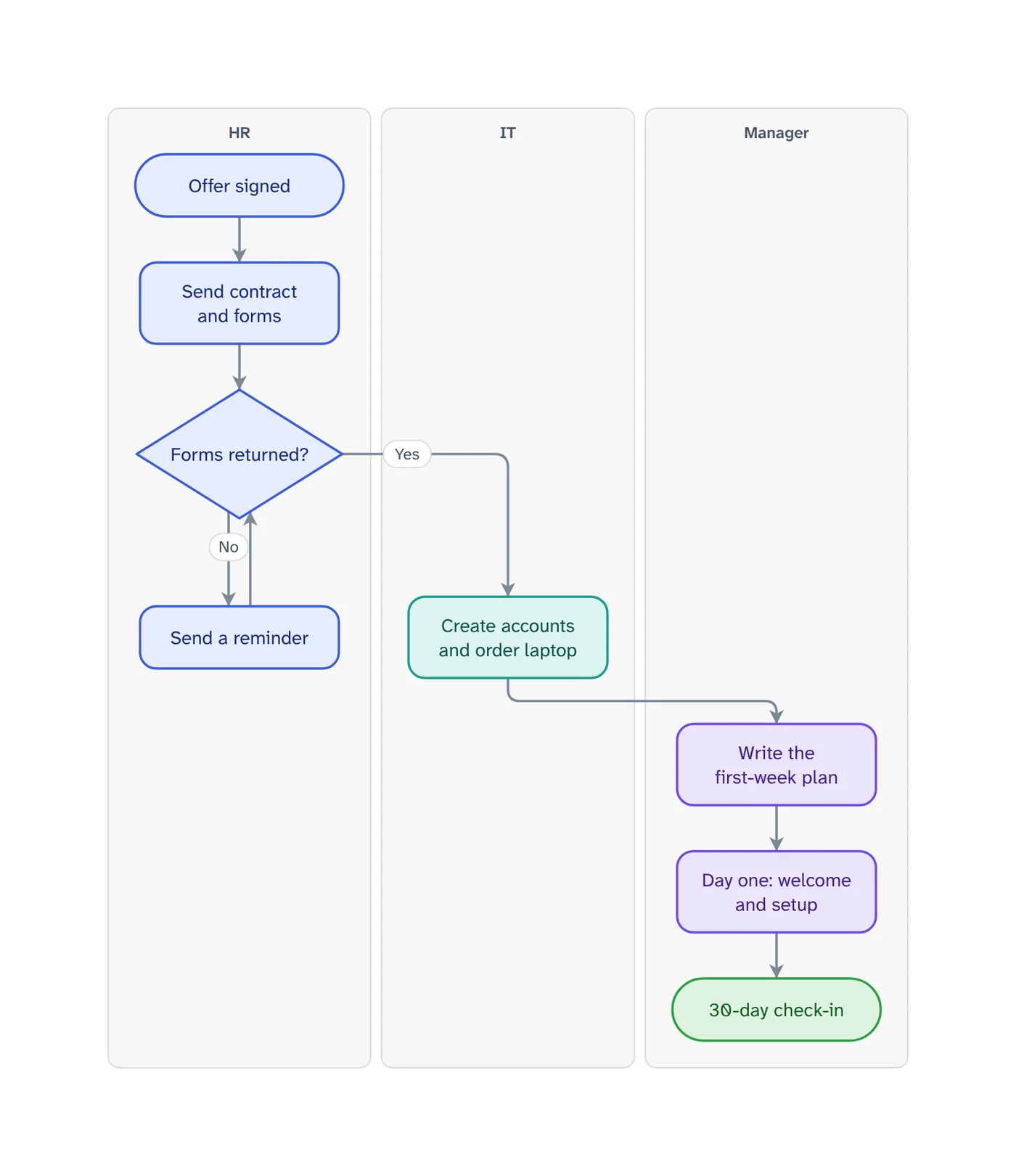
Onboarding is a relay between HR, IT and the manager, and the new person feels every dropped baton. Describe your steps and VamimiAI draws the onboarding flowchart, with one lane for each of them.
The prompt: Onboarding process flowchart for a new employee, with lanes for HR, IT and the hiring manager, from signed offer to the 30-day check-in
. It goes into the message box for you to edit; nothing is sent until you press Send.
How it works
List who does what
Write the steps from the signed offer to the end of the first month and say who owns each: HR, IT, the manager, the new hire.
Get the flowchart
One lane for each owner, the steps in order, and a decision wherever something can come back incomplete.
Refine by asking
Say “add a retry”, “split the payment step” or “make it left to right”. Only what you ask for changes.
What you get
One lane for each owner
HR, IT, the manager and the new hire each get a lane, so everyone can find their own steps at a glance.
The waits are visible
A line that crosses lanes is a hand-off. Those are the places where a laptop is not ordered or an account is not ready on day one.
Start from a document
Attach a policy, spec or spreadsheet and ask for the diagram. Most files are read right in your browser.
Checked for gaps
Logic checks catch a decision with only one exit, a step that leads nowhere and a step nothing reaches.
Edit by hand too
Drag, resize, connect, add shapes, type labels, undo and redo. Your next message continues from your version.
Download anywhere
SVG, PNG, JPEG or PDF for every visual. Flow diagrams also export to draw.io and Mermaid.
What an onboarding flowchart is for
An onboarding checklist tells one person what to do. An onboarding flowchart shows everyone how their part connects to the others: what has to be finished before IT can create accounts, who waits for whom, and what happens when a form does not come back.
Draw it from the moment the offer is signed, not from day one. Most of what goes wrong on a first day was decided in the two weeks before it: equipment that was not ordered, access that was not requested, a manager who was not told the start date.
End it later than you think. A first day is an event; onboarding is finished when the person can do the job, which is why most teams draw at least a check-in at 30 days.
Employee onboarding flowchart: the steps most teams draw
Before day one: the contract and forms go out and come back, payroll and benefits are set up, accounts are created and equipment is ordered, and the manager writes a plan for the first week.
Day one and week one: a welcome, the workplace or remote setup, introductions, the first training and a first small task. First month: regular check-ins, the remaining training and a review at 30 days. Use these as a starting list and replace them with what your team really does.
Client onboarding flowchart
The same picture works for a new client: the signed agreement, the kick-off call, the access and information you need from them, the first delivery and the first review. Give the client their own lane; the steps that wait on them are usually the ones that hold everything up.
From a checklist or handbook you already have
If your onboarding lives in a checklist, a handbook page or a spreadsheet, attach it. VamimiAI reads PDF, Word, Excel, CSV and text files and draws the flowchart from the steps in the document; then ask for lanes by owner.
Prompts to start from
- Onboarding process flowchart for a new employee, with lanes for HR, IT and the hiring manager, from signed offer to the 30-day check-inTry it →
- Client onboarding flowchart for an agency: signed contract, kick-off call, access requests, first delivery, first reviewTry it →
- Remote employee onboarding flowchart, including shipping the laptop and what happens if it arrives lateTry it →
- Offboarding flowchart: resignation, handover, returning equipment and closing accountsTry it →
Questions
What is an onboarding process flowchart?
A diagram of everything that happens between a signed offer and a settled new hire, in order, showing who does each step and where work passes from one person to the next.
What steps should an onboarding flowchart include?
Usually: paperwork sent and returned, payroll and accounts set up, equipment ordered, a first-week plan, day one, training and check-ins up to a first review. Draw the steps your team really has, and who owns each.
Can it show who is responsible for each step?
Yes. Name the owner of each step and ask for a swimlane diagram: each owner gets a lane.
Can I make it from our existing checklist?
Yes. Attach the checklist as a PDF, Word, Excel, CSV or text file and ask for the flowchart.
Can I put it in our handbook?
Yes. Download it as PNG, JPEG, SVG or PDF and place it in the document, wiki or slide where people will look for it.
Guides on this
Make something else
- Process flowchart makerWrite how the work gets done, in the order it happens, or attach the procedure you already have.
- Swimlane diagram makerWhen a process passes between people or teams, a swimlane diagram shows who does each step.
- Org chart makerTell VamimiAI who reports to whom, or attach the spreadsheet you already have, and it draws the org chart from the top down.
- AI timeline makerDescribe a project plan, a history or a sequence of events.
Part of Process mapping: Process maps for operations, HR, support and product teams: process flowcharts, onboarding flows, decision trees and user flows, drawn from a description.
Describe it. Get the diagram.
No account needed. Write what you want, or attach a document, and refine the result by asking.
Open VamimiAI