 Vamimi
n8n to Mermaid and draw.io, from the workflow file
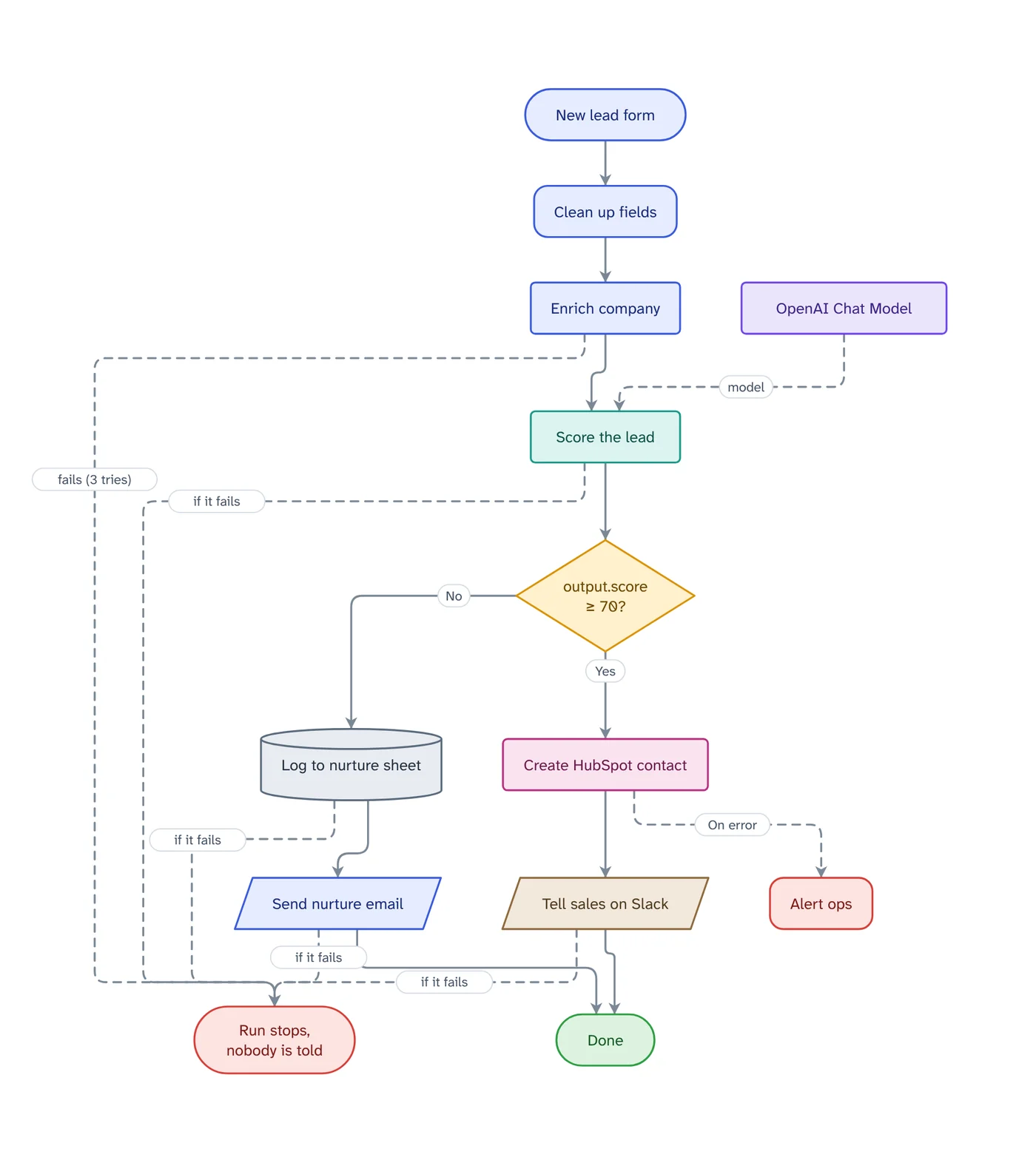
Drop an n8n workflow export into VamimiAI and download it as Mermaid text or an editable draw.io file. Every node becomes a plain step, branches keep their labels, and error paths are part of the diagram, not left out.
The prompt: Draw this n8n workflow so I can paste it into our README as Mermaid
. It goes into the message box for you to edit; nothing is sent until you press Send.
How it works
Export from n8n
Choose Download from the workflow's menu, or copy the nodes. Both give the workflow as JSON.
Drop it into VamimiAI
The file is read as it is, with no AI guesswork: nodes, If and Switch exits, loops and error outputs.
Download Mermaid or draw.io
Save a .mmd file, copy the Mermaid text straight into a README or wiki, or download an editable draw.io file.
What you get
Mermaid you can paste
Flowchart text with escaped labels, so quotes, angle brackets and Mermaid keywords in node names do not break the diagram.
draw.io you can edit
An uncompressed draw.io file with the shapes, text, colours and positions of the diagram, ready to rearrange in draw.io.
The failures included
Error outputs and the red ends for unprotected calls are part of the exported diagram, so the README shows what happens when a step fails.
Make blueprints too
A Make scenario blueprint imports the same way and downloads to the same formats.
Checks before you share
The import lists webhooks without authentication, keys typed into a node and branches that lead nowhere.
Download anywhere
SVG, PNG, JPEG or PDF for every visual. Flow diagrams also export to draw.io and Mermaid.
Why Mermaid beats a screenshot of the n8n canvas
A screenshot goes out of date the moment the workflow changes, and it cannot be searched, diffed or reviewed in a pull request. Mermaid is text: it lives next to the code or the runbook, renders on GitHub, GitLab and most wikis, and changes show up line by line.
Converting by hand, or asking a chatbot to describe the JSON, tends to drop the paths nobody draws: the error outputs and the steps that stop the run when a service is down. Reading the export directly keeps them.
Make blueprint to Mermaid
Export the blueprint from the scenario editor and drop it in. Routes become labelled branches, filters label the way into a module, and error handler routes end in what their directive does. Download it as Mermaid or draw.io like any other diagram.
Prompts to start from
Questions
Does it convert n8n JSON to Mermaid directly?
Yes. Import the workflow file, then choose Mermaid in the Download menu, or Copy as Mermaid text to paste it straight into a README.
Can I edit the result in draw.io?
Yes. The draw.io download is an ordinary editable file. Connectors are left for draw.io to route, so they stay easy to move.
Are my credentials included?
No. Only the names of the credentials are used, to list the accounts the workflow needs. Values are never read into the diagram.
Does it work for Zapier?
Zapier exports are read on a best-effort basis, because Zapier does not publish its export format. Check the diagram against your Zap.
Make something else
- n8n workflow diagram from your export, with every error pathDownload the workflow from n8n and drop the file into VamimiAI.
- Turn a Make blueprint into a flowchart your client can readExport the blueprint from Make and drop it into VamimiAI.
- Mermaid diagram generator: describe it, get the codeDescribe a flow in plain words and VamimiAI draws it, then gives you the Mermaid code for it.
- AI diagrams you can open in draw.ioLet VamimiAI do the layout from a description, then download an editable draw.io file and keep working in the tool your team already uses.
Part of Automation documentation: Diagrams, failure checks and handover documents for the automations you build for clients: n8n workflows, Make scenarios and Zaps.
Describe it. Get the diagram.
No account needed. Write what you want, or attach a document, and refine the result by asking.
Open VamimiAI