 Vamimi
Mermaid diagram generator: describe it, get the code
Describe a flow in plain words and VamimiAI draws it, then gives you the Mermaid code for it. Paste the code into a README, a wiki or any tool that renders Mermaid.
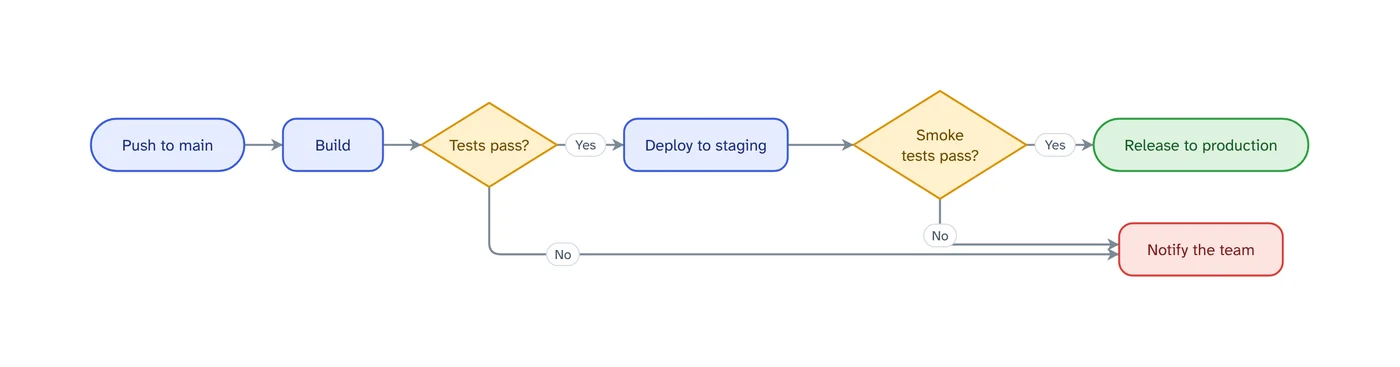
The prompt: Flowchart of our CI pipeline from push to production, including failed tests
. It goes into the message box for you to edit; nothing is sent until you press Send.
How it works
Describe the flow
A process, a pipeline or an interaction between services.
Check the diagram
See it drawn and laid out, and fix anything by asking or by hand.
Export Mermaid
Download a .mmd file or copy the Mermaid text from the Download menu.
What you get
Flowcharts and sequences
Flow diagrams export as Mermaid flowcharts, sequence diagrams as Mermaid sequence diagrams.
Safe labels
Quotes, angle brackets and words Mermaid treats as keywords are escaped, so the code renders as drawn.
Built in your browser
The Mermaid code is generated from the diagram on screen, in your browser.
Edit by hand too
Drag, resize, connect, add shapes, type labels, undo and redo. Your next message continues from your version.
Download anywhere
SVG, PNG, JPEG or PDF for every visual. Flow diagrams also export to draw.io and Mermaid.
Saved to your account
Sign in with Google or email and your chats, diagrams and folders are there on every device. Download everything or delete your account from the app at any time.
Why keep diagrams as Mermaid
Mermaid diagrams are plain text, so they live in version control next to the code they describe, show up in code review and are rendered by many documentation tools.
Writing Mermaid by hand is slow for anything with more than a few branches. Describing the flow in words, checking the drawing, then exporting the code gets you the text without learning the syntax.
Prompts to start from
Questions
Which diagrams export to Mermaid?
Flow diagrams (including architecture and swimlane diagrams) and sequence diagrams. Charts, tables and timelines download as images or PDF instead.
Do I need to know Mermaid syntax?
No. You describe the diagram in words; the Mermaid code is generated for you.
Can I also get an image?
Yes. Every diagram downloads as SVG, PNG, JPEG or PDF as well.
Make something else
- n8n to Mermaid and draw.io, from the workflow fileDrop an n8n workflow export into VamimiAI and download it as Mermaid text or an editable draw.io file.
- Sequence diagram generatorExplain an interaction in plain words, such as a login, a payment or a webhook, and VamimiAI draws the sequence diagram: participants left to right, messages in order, replies dashed.
- AI diagrams you can open in draw.ioLet VamimiAI do the layout from a description, then download an editable draw.io file and keep working in the tool your team already uses.
- AI flowchart generatorWrite how a process works, the way you would explain it to a colleague.
Part of Diagram makers: Every kind of visual VamimiAI makes from a description: flowcharts, sequence, architecture and swimlane diagrams, mind maps, org charts, charts and timelines.
Describe it. Get the diagram.
No account needed. Write what you want, or attach a document, and refine the result by asking.
Open VamimiAI