 Vamimi
Turn a Make blueprint into a flowchart your client can read
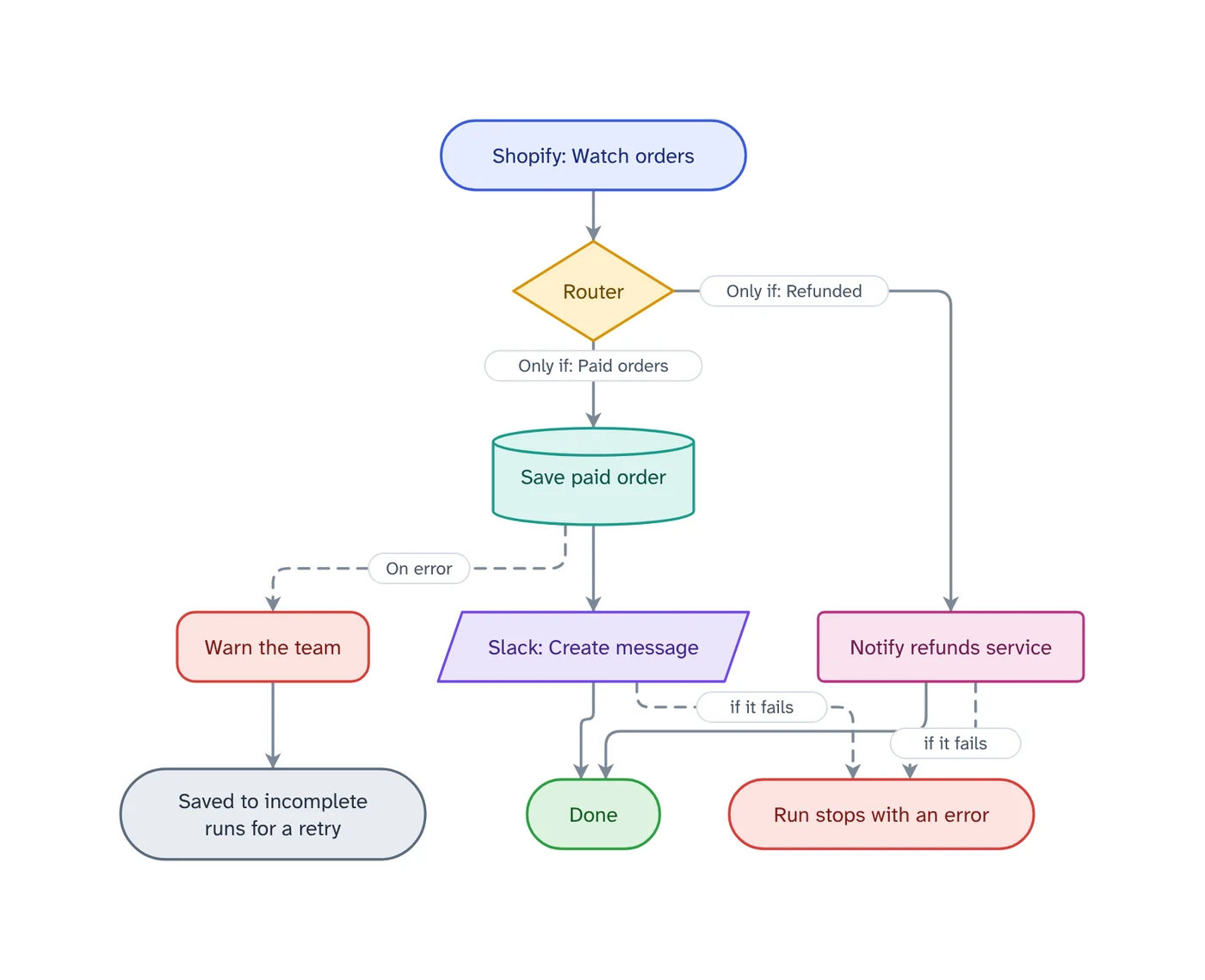
Export the blueprint from Make and drop it into VamimiAI. Routers become labelled branches, filters label the path into a module, and error handler routes end in what their directive really does.
The prompt: Draw the error handling for a Make scenario that syncs Shopify orders to Airtable
. It goes into the message box for you to edit; nothing is sent until you press Send.
How it works
Export the blueprint
In the scenario editor open the menu and choose Export Blueprint. You get a .json file.
Attach it
Drop the file into the chat. It is read straight from the blueprint, with no AI guesswork.
Hand it over
Check what is flagged, ask for a plain-words explanation, and create the client handover document.
What you get
Routes and filters
Each router route is its own branch, and a filter's name labels the way into its module.
Error handlers that say what they do
Ignore, Resume, Commit, Rollback and Break end in plain words, such as Saved to incomplete runs for a retry.
Checks before handover
Modules with no error handler, scenarios that do not keep failed runs, and keys typed into a module.
Tables for the client
What each module does, what happens if it fails, and the connections it needs.
Edit by hand too
Drag, resize, connect, add shapes, type labels, undo and redo. Your next message continues from your version.
Download anywhere
SVG, PNG, JPEG or PDF for every visual. Flow diagrams also export to draw.io and Mermaid.
What a client needs to see in a Make scenario
The scenario editor is built for the person who builds it. A client wants the same thing in words: what starts it, which apps it touches, and what happens to an order or a lead when one of those apps is down.
In Make, a module without an error handler stops the run with an error, and after the set number of failed runs in a row the scenario is switched off. Keeping incomplete executions lets a failed run be retried instead of lost. VamimiAI reads both from the blueprint and says so in the checks.
What a Make blueprint is
A Make blueprint is the scenario saved as a .json file: every module, its settings and mappings, the routes and their filters, and the error handlers. Make uses it to copy a scenario into another account or team, which also makes it the most complete description of what the scenario does.
Export a Make blueprint
Open the scenario, choose Export Blueprint from the menu at the bottom of the editor, and keep the .json file. Make advises reviewing a blueprint for fixed values and sensitive data before you share it; VamimiAI flags a key typed into a module by where it is, never by its value.
Make scenario documentation from the blueprint
Asking a chatbot to describe the blueprint gives you prose that may leave out a route. Importing it reads every module, route, filter and error handler as written, then gives you the diagram, a table of what each module does and what happens if it fails, and the connections it needs, ready for the handover document.
Prompts to start from
- Draw the error handling for a Make scenario that syncs Shopify orders to AirtableTry it →
- Design a Make scenario that sends invoice reminders, with what happens when an email bouncesTry it →
- Compare n8n, Make and Zapier for a client with 2,000 orders a month in a tableTry it →
- Explain this scenario for a non-technical clientTry it →
Questions
How do I export a Make scenario?
Open the scenario, choose Export Blueprint from the menu at the bottom of the editor, and attach the .json file.
Are my connections read?
A blueprint holds only connection numbers, so the accounts are listed by app, such as Slack connection. No keys or passwords are used.
Does it understand routers and error handlers?
Yes. Each route is drawn as a branch, filters label the way in, and an error handler route is drawn dashed and ends in what its directive does.
Can I import Zapier too?
Yes, from a Zapier export file. Zapier does not publish its export format, so that import is a best effort and says so; check the diagram against your Zap.
Guides on this
- n8n vs Make vs Zapier for Client Work: Failures and Handovern8n vs Make vs Zapier compared on what matters after you hand an automation to a client - what happens when a step fails, who is told, and how you document it.1 November 2026 · 4 min read
- Make Scenario Deactivated? Errors and Incomplete ExecutionsWhy Make switches a scenario off, what "not enough space to add a new incomplete execution" means, and the settings that keep a scenario running.1 November 2026 · 3 min read
- Make Error Handlers: Break, Rollback, Commit, Ignore, ResumeWhat each Make error handler directive does to the run, the bundle and your data, when to use it, and the scenario settings that decide if a failure is lost.1 November 2026 · 4 min read
Make something else
- n8n workflow diagram from your export, with every error pathDownload the workflow from n8n and drop the file into VamimiAI.
- The automation handover document, made for youWhen an automation goes live, the client needs to know what it does and what to do when it stops.
- n8n to Mermaid and draw.io, from the workflow fileDrop an n8n workflow export into VamimiAI and download it as Mermaid text or an editable draw.io file.
- AI diagrams you can open in draw.ioLet VamimiAI do the layout from a description, then download an editable draw.io file and keep working in the tool your team already uses.
Part of Automation documentation: Diagrams, failure checks and handover documents for the automations you build for clients: n8n workflows, Make scenarios and Zaps.
Describe it. Get the diagram.
No account needed. Write what you want, or attach a document, and refine the result by asking.
Open VamimiAI